
Atoms
Introduction
Atoms represent small pieces of reusable and shareable state, and maintain their own internal stores. Atoms represent small pieces of reusable state, and maintain their own internal store. Whenever an update is triggered (by calling the setter function of that Atom), the Atoms store dispatches an event. All components (and Selectors) that are subscribed to that Atom will get the event, trigger an update, and cause only the relevant components to update and rerender.
The atom function takes an object with 2 properties:
key: a unique key to identify the Atom, this key will also be made available as a property on your custom element to read the Atom stores value fromdefault: a default value
import { atom } from '@klaxon/atom';

const [count, setCount] = atom({
  key: 'count', // assign the value a *unique key*
  default: 1 // and the Atom store's default value
});

console.log(count.getState()); // 1

setCount(2);

setCount(old => old + 1);

console.log(count.getState()); // 3
An Atoms default value can be a boolean, number, string, array, object or a function.
const [list, setList] = atom({
  key: 'list',
  default: [{text: 'hello!'}]
});

setList((old) => [...old, {text: 'bye!'}]);

console.log(list.getState()); // [{text: 'hello'}, {text: 'bye!}]
const [obj, setObj] = atom({
  key: 'obj',
  default: {text: 'hello!', age: 20}
});

setObj((old) => ({...old, age: 30}));

console.log(obj.getState()); // {text: 'hello!', age: 30}
Etcetera.
Subscribing to Atoms
You can subscribe components to an Atom by adding it to the static atoms getter, and using the LitAtom Mixin:
class MyCounter extends LitAtom(LitElement) {
  static atoms = [count];

  render() {
    return html`
      <h1>count: ${this.count}</h1>
      <button @click=${() => setCount(old => old + 1)}>increment</button>
      <button @click=${() => setCount(old => old - 1)}>decrement</button>
    `;
  }
}
Note that it's not required to add
doubleCountto LitElements staticpropertiesgetter. It's still fine to do however if, for example, you want to access the value during LitElements lifecycle callbacks, likeupdated.
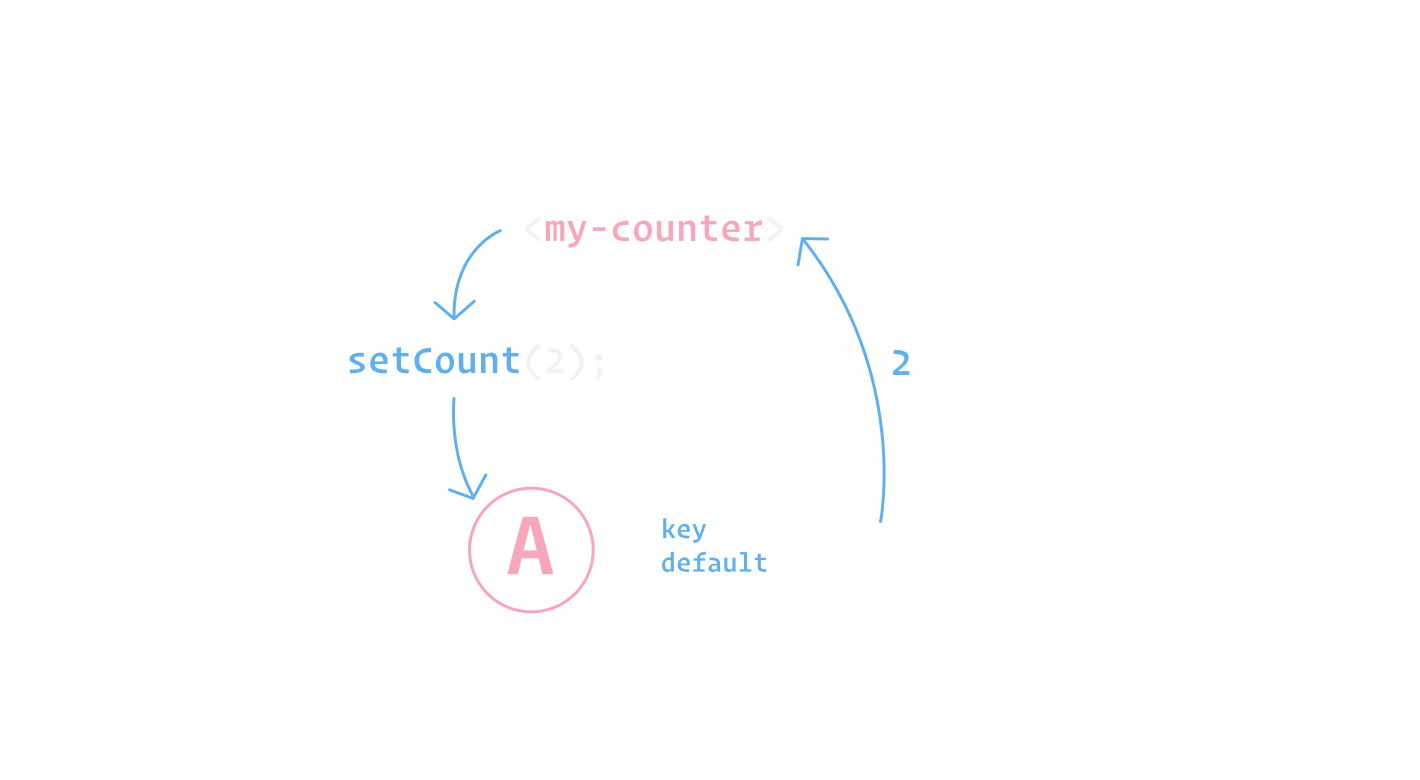
The LitAtom mixin will subscribe to any changes for the num Atom, and rerender your component. You can access the value of the num Atom in your component like so: this.num (👈 the key value of the Atom).
Updating Atoms
When you initialize a new Atom, you also get an update, or setter function. You can either set the value directly, or pass it a callback. The callback is given the previous state as argument, so you can modify the old state as you please and then return the new state.
import { atom } from '@klaxon/atom';

const [count, setCount] = atom({
  key: 'count',
  default: 1
});

// Sets the value directly
setCount(2);

// Gets a function with as parameter the previous state
setCount(old => old + 1);
Updating Atoms with the LitAtom Mixin
If you're using the LitAtom Mixin, you can also call this.updateAtom. updateAtom takes an Atom, and either a value or a function.
class MyCounter extends LitAtom(LitElement) {
  static atoms = [count];

  render() {
    return html`
      <h1>count: ${this.count}</h1>
      <button @click=${() => this.updateAtom(count, old => old + 1)}>increment</button>
      <button @click=${() => this.updateAtom(count, old => old - 1)}>decrement</button>
    `;
  }
}
Sharing Atoms
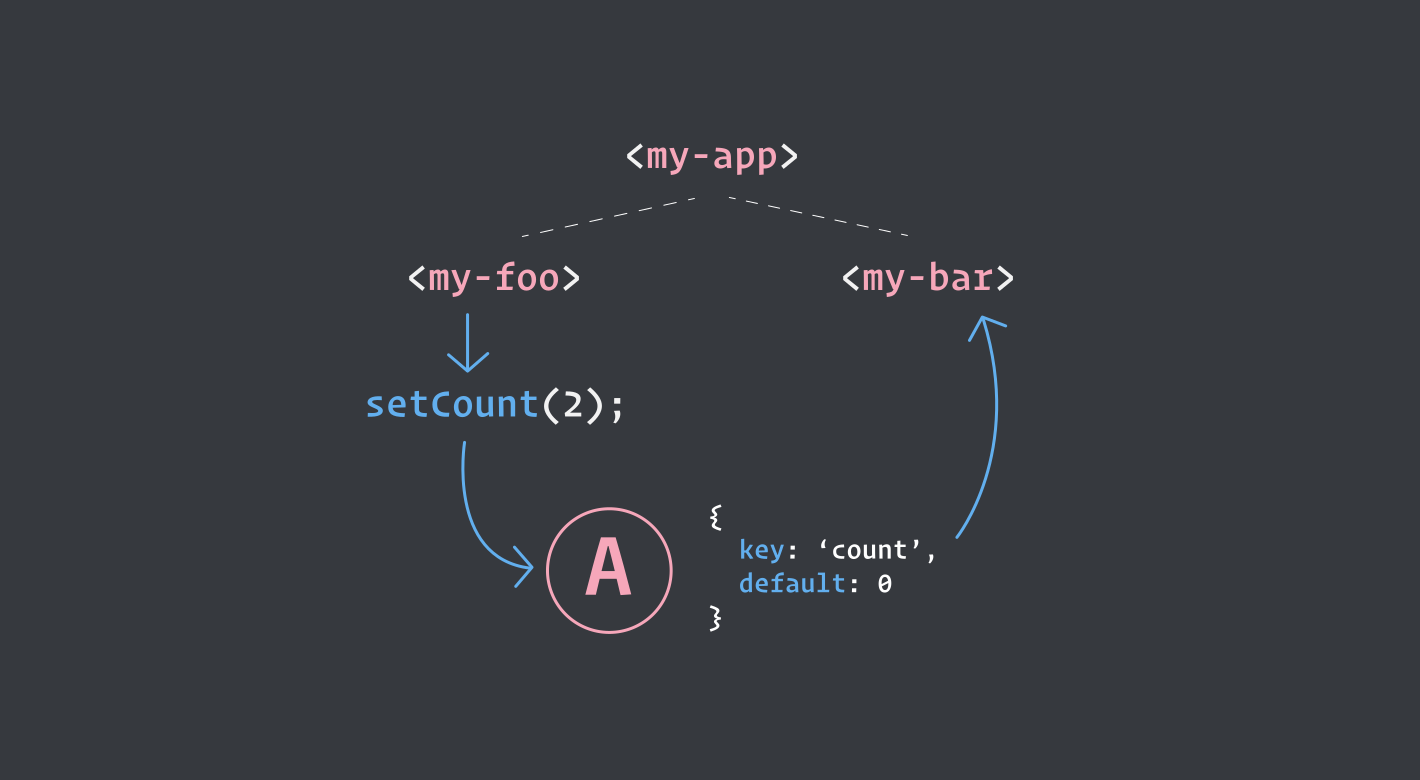
Atoms can be shared across many different components, independent from eachother. Any component that subscribes to an Atom will be updated and rerendered as soon as that Atom changes.
Effects
⚠️ This is an experimental API, and may be renamed to
middlewaresin the future.
Atoms may also have an optional array of effects, which can be useful for running side effects any time your Atom changes, like logging for example. You can optionally return a cleanup function from your effect which will run whenever your component disconnects from the DOM.
const [count, setCount] = atom({
  key: 'count',
  default: 1,
  effects: [
    () => {
      console.log('Im logged any time `count` changes!');
      return () => {
        console.log('Im logged whenever components that subscribe to this atom disconnect!');
      }
    }
  ]
});
Reducers
If you're interested in a reducer-like pattern, its easy to create your own dispatch functionality by wrapping an atoms update function:
const [state, setState] = atom({
  key: 'state',
  default: {count: 0}
});

const dispatch = (action) => {
  setState(state => {
    switch (action.type) {
      case 'increment':
        return {count: state.count + 1};
      case 'decrement':
        return {count: state.count - 1};
      default:
        return state;
    }
  });
}

dispatch({type: 'increment'});
Parameterized Atoms
If you need to create Atoms dynamically or create Atoms based on parameters, you can wrap the atom in a function:
const createTodo = id => atom({
  key: `todo-${id}`,
  default: { id, text: "", isComplete: false },
});

const [todo, setTodo] = createTodo(1);
Data fetching
A simple way of changing state when fetching data could look like this:
const [character, setCharacter] = atom({
  key: 'character',
  default: {
    status: 'pending',
    result: {}
  }
});

async function getStarwarsCharacter(id) {
  setCharacter(old => ({...old, status: 'pending'}));
  try {
    const res = await fetch(`https://swapi.dev/api/people/${id}`);
    const body = await res.json();
    setCharacter({
      status: 'success',
      result: body
    });
  } catch {
    setCharacter(old => ({...old, status: 'error'}));
  }
}
However, Atom also comes with the concept of async, or loadable Atoms that can help simplify this pattern:
Async Atoms
You can also use Atoms for fetching data, or doing asynchronous work.
const [query, setQuery] = atom({
  key: 'query',
  // you can optionally use a default parameter
  loadable: async (id = 1) => {
    const res = await fetch(`https://swapi.dev/api/people/${id}`);
    const body = await res.json();
    return body;
  }
});
Note that if you use the
loadablefunctionality, you can't set adefault.
This Atoms store will be an object that looks like this:
{
  status: "initialized",
  result: null
}
A loadable Atoms status can either be:
"initialized""pending""success""error"
To actually execute the loadable function, you can run the setQuery function in the connectedCallback of your component (or anywhere you need to call it). Multiple components can safely make use of shared loadable Atoms, because the loadable function only executes when you explicitly call the Atoms setter function, but the state of the Atom is still shared and updated between components.
Whenever the status of the loadable promise changes (on load, on success or on error), the Atom will notify itself and trigger an update in your component or any Selectors that may depend on it.
The result property will be populated with the return value of the loadable promise, or, in case of error; the error.
Usage in components:
You can use a loadable Atom in your components like this:
const [query, setQuery] = atom({
  key: 'query',
  // you can optionally use a default parameter
  loadable: async (id = 1) => {
    const res = await fetch(`https://swapi.dev/api/people/${id}`);
    const body = await res.json();
    return body;
  }
});

class MyApp extends LitAtom(LitElement) {
  static atoms = [query];

  connectedCallback() {
    super.connectedCallback();
    setQuery();
  }

  render() {
    switch(this.query.status) {
      case 'success':
        return html`Success! ${this.query.result.name}`
      case 'error':
        return html`error! :(`
      case 'pending':
      case 'initialized':
        return html`Loading...`
    }
  }
}
Updating loadable Atoms
You can retrigger loadable Atoms with the setter function returned from the Atom.
setQuery(2);

// or `await` it
await setQuery(2);
Combining loadable Atoms with Selectors
You can also combine loadable Atoms with Selectors. Whenever the status of the loadable Atom changes, the Selector is run.
const [query, setQuery] = atom({
  key: 'query',
  loadable: async (id = 1) => {
    const res = await fetch(`https://pokeapi.co/api/v2/pokemon/${id}`);
    const body = await res.json();
    return body;
  }
});

const renderStatus = selector({
  key: 'renderStatus',
  get: ({getAtom}) => {
    const { status, result } = getAtom(query);

    switch(status) {
      case 'success':
        return html`Success! ${result.name}`
      case 'error':
        return html`error! :(`
      case 'initialized':
      case 'pending':
        return html`Loading...`
    }
  }
});

class MyApp extends LitAtom(LitElement) {
  static selectors = [renderStatus];

  connectedCallback() {
    super.connectedCallback();
    setQuery();
  }

  render() {
    return this.renderStatus;
  }
}